Unlock the Hidden Features of WordPress.com That Will Revolutionize How You Own Your Website
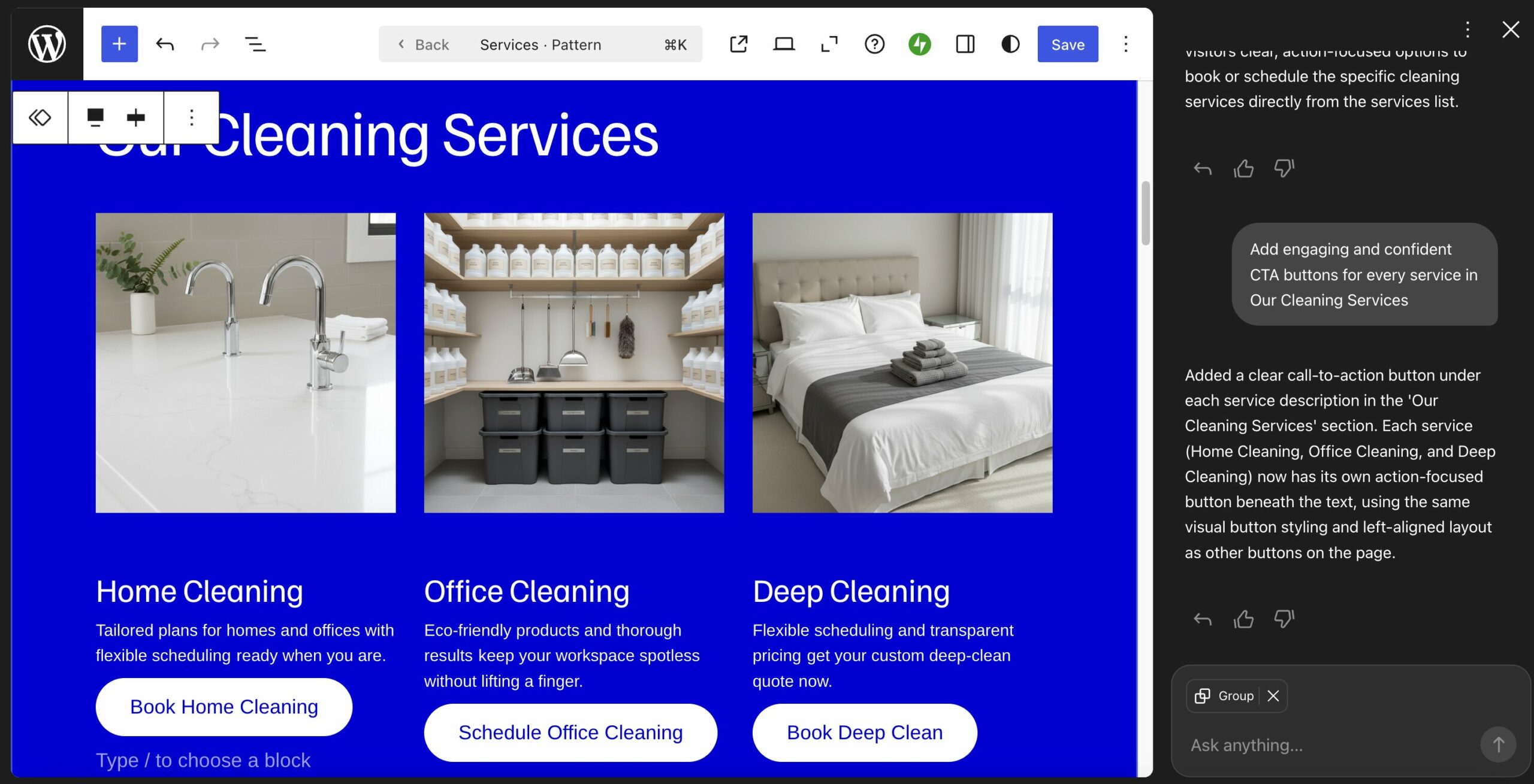
” data-medium-file=”https://en-blog.files.wordpress.com/2026/02/claude-ai-wordpress-integration.jpg?w=300″ data-large-file=”https://en-blog.files.wordpress.com/2026/02/claude-ai-wordpress-integration.jpg?w=1024″ loading=”lazy” width=”1884″ height=”1296″ src=”https://en-blog.files.wordpress.com/2026/02/claude-ai-wordpress-integration.jpg” alt=”Screenshot of a WordPress site connected to Claude. ” class=”wp-image-84101″ srcset=”https://en-blog.files.wordpress.com/2026/02/claude-ai-wordpress-integration.jpg 1884w, https://en-blog.files.wordpress.com/2026/02/claude-ai-wordpress-integration.jpg?w=150&h=103 150w, https://en-blog.files.wordpress.com/2026/02/claude-ai-wordpress-integration.jpg?w=300&h=206 300w, https://en-blog.files.wordpress.com/2026/02/claude-ai-wordpress-integration.jpg?w=768&h=528 768w, https://en-blog.files.wordpress.com/2026/02/claude-ai-wordpress-integration.jpg?w=1024&h=704 1024w, https://en-blog.files.wordpress.com/2026/02/claude-ai-wordpress-integration.jpg?w=1440&h=991 1440w” sizes=”(max-width: 1884px) 100vw, 1884px”>
All this helps you focus on the actions, pages, content, and opportunities that actually drive business results.
5. Work with real humans who treat your site like it matters
That said, you don’t have to figure everything out alone.
With WordPress.com’s website design services, real WordPress experts build your site with you — refining your vision, making sure it looks professional, and helping you launch with confidence.
Take Jason, a WordPress.com user who wanted a website to support his son’s motorcycle racing journey. He worked directly with the WordPress.com team to refine the design and structure, so it felt credible and ready to launch.

But the help didn’t stop at launch. The team continued guiding him through SEO setup, plugin choices, and planning his rollout strategy.
That’s the difference. You’re not just buying a template. You’re getting real people who help you build it right — and stay available as your site evolves.
6. Restore your website, even if you are locked out
Every WordPress.com site is automatically backed up behind the scenes. You don’t need to install a plugin or set up a backup schedule — it’s handled for you.
On Business and Commerce plans, you can also restore your site yourself with one click — even if you can’t access your WordPress dashboard.

Like all other features, backups and restores happen on the platform level. This means you don’t need to log in to your site or server. Trust me, the last thing you want to do in this situation is struggle to get your website back.
7. Automate site updates without worrying
WordPress.com keeps your site up to date automatically — without you managing core updates, plugins, themes, or server software.
On most setups, it’s your responsibility to update WordPress core, plugins, themes, and even PHP. On WordPress.com, that maintenance is handled for you and coordinated to reduce compatibility issues and update-related errors.
How so?
First of all, core website updates are applied automatically, as are new versions of plugins and themes. Server maintenance is also taken care of for you.

Because the platform and infrastructure are built to work together, updates are tested and coordinated before they reach your site. That reduces the chance of something breaking after an update.
And if you want more control, you still have it. For example, on Business and Commerce plans, you can change your PHP version from the site settings — no server access required.

8. Use plugins to add features, not crucial infrastructure
On WordPress.com, security and performance are built in — so plugins serve to add features rather than fix fundamentals.
On many setups, you install plugins just to handle backups, security, or caching. Here, that infrastructure is already managed for you. For example, all WordPress.com sites come with Jetpack, which offers SEO tools, analytics, newsletter functionality, additional editor blocks, and more.
That means you can focus on adding capabilities instead — ecommerce, memberships, translations, forums, and more.





Post Comment