Unlock the Secret to Effortlessly Building a Stunning Small Business Website on WordPress.com!
Four pages your small business website needs
Start with what a customer needs to know before they pick up the phone. For a service business, four pages can do most of the work:
1. Homepage
Say what you do, who you help, and where you work if you serve a particular area. A great site that never says what to do next is like a shop with no door handle.
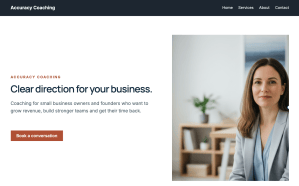
On the Accuracy Coaching homepage, I asked the WordPress Agent to add a button below the opening paragraph that takes visitors to the Contact page.
Choose the action that makes sense for your business and repeat it where people are likely to be ready, like after your services. One clear ask beats five competing ones.

2. Services
Nothing stalls a customer like not knowing what you sell. Give your services their own page, and explain what each one is, who it’s for, and what the customer gets.
If prices make sense for your business, share them. If you quote per project, say how that works. On Sarah’s Services page, I added a section for packages and pricing. Clear beats clever.

3. About
People like buying from people. Share why you started, what you care about, and how you work. A few personal details can make your story more memorable.
Add a team photo, or a photo of yourself if you work solo. If you have a team, introduce each person and their role so visitors know who they’ll be working with.

4. Contact
Give people a clear way to reach you. The Accuracy Coaching site already had a form on its Contact page. If you’re setting up your own, ask for the details you’ll need to reply.
Think about the questions you answer repeatedly. How long does it take? What’s included? How do I get started? I added an FAQ section to the Accuracy Coaching site so prospective clients could find those answers. Keep them short and plain, and put them where people are likely to look.

Build and customize your site with WordPress Agent
Starting from scratch is hard. Describe your business to the WordPress Agent in plain language. Tell it what you do, who you help, and the feel you’re after. Think of it as briefing a designer. For a site like Accuracy Coaching’s, you could start with something like this.
Prompt
Build a website for Accuracy Coaching. Sarah helps small business owners with planning and growth. Give her a place to explain her coaching services and make it easy for prospective clients to get in touch.
Review the site brief and make any adjustments before the agent builds your pages. From there, the agent can help you adjust colors, fonts, text, and images. You can also make changes by hand. Think of it as a strong first draft that you then make your own.

Test your contact or booking flow before launch
Open your site on your phone and try the same thing you’re asking customers to do. On Sarah’s site, that means tapping the homepage button and sending a test message through the Contact page. Check that you see a confirmation and the message reaches you.
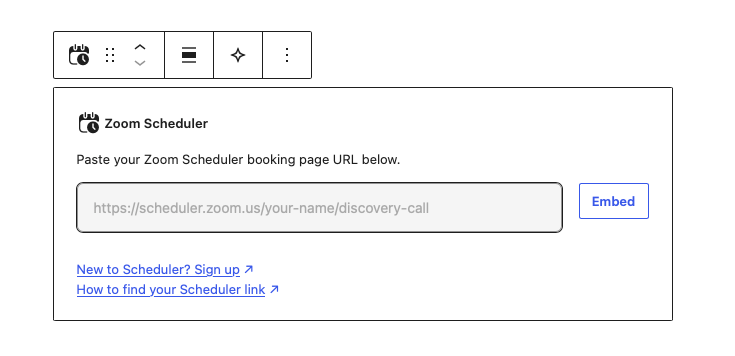
If you take appointments, you can also put a booking calendar right on your site. In the video, I show the Zoom Scheduler block as an option for businesses that use Zoom Scheduler.
Before you go live, check that your hours, prices, and contact details are current wherever they appear. And look the part in every inbox. Professional email uses your own domain name, so your messages match your brand from the first hello.
Your site doesn’t have to be perfect on day one. Once people can see what you offer and get in touch, you’re ready to launch. You can improve it as your business grows.

Help AI platforms recommend you
Many people now ask AI assistants for recommendations, not just search engines. No one can promise you’ll be the one they suggest. But a clear, well-organized site gives you the best chance.
Here’s what helps:
- Show proof: Testimonials, reviews, and mentions elsewhere on the web all build a picture of who you are.
- Say what you do in plain words: Name your services, who they’re for, and where you work, on your homepage and your About page.
- Keep your details consistent: Use the same business name, address, and contact details everywhere they appear.
- Use real questions and descriptive headings: Your FAQ and page titles should match how customers actually talk.
- Keep it current: Outdated hours and prices are easy for people and AI to spot.
Start with a description of your business
Think of the last person who asked about your business. What would you want them to see first? Tell the WordPress Agent, and it’ll build a first draft you can make your own.
Once someone can see what you offer and how to get in touch, you’ve got a site worth sharing.




Post Comment