Unlock the Secret to Managing Every Website Effortlessly with Just One Click!

What changes when you manage multiple sites
These changes become clearest when you’re switching between sites or repeating the same task across several of them.
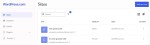
Managing client sites: Routine tasks add up when you’re managing several sites, including the same plugins that need updating. Previously, that meant navigating out, switching sites, and starting over every time. Now your sites are always visible in the persistent nav. Move between them without losing your place.
Running multiple blogs or stores: Checking hosting status, renewing domain names, reviewing updates — tasks that used to require bouncing between dashboards are now accessible from one consistent view. Less hunting, more doing.
Coming from self-hosted WordPress: One reason people stay self-hosted is that WP Admin feels like home. The Hosting Dashboard follows the same sidebar logic, so moving between self-hosted WordPress and WordPress.com asks less of you.
One dashboard, whether you manage one site or 200
Whether you’re managing a handful of sites or a full client roster, the Hosting Dashboard works the same way.
The interface doesn’t change as you grow, and neither does your workflow. The same navigation and workflow stay consistent as your site list grows.
This is only a navigation update — your sites, content, and settings stay exactly as they are.
Try your improved Hosting Dashboard
The updated navigation is now live in your Hosting Dashboard. Open it and try switching between a couple of sites, and you’ll see everything stays where you left it.
If you have any feedback or questions, our support team is here to help.