Discover the Surprising Truth Behind the Best Grammar Checker You’ve Never Heard Of!
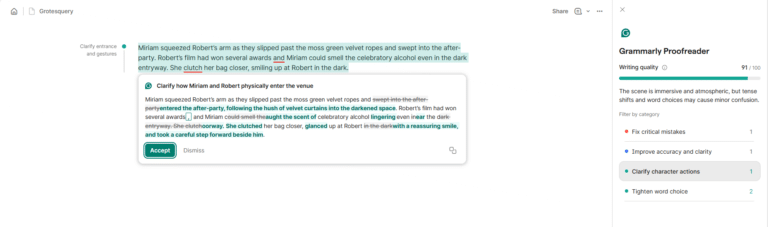
As a writer, a good proofreading software is the Robin to your Batman. How else will you know when you’ve used a semicolon in the right spot? Today, let’s explore the best grammar checker for you and your book.
There are so many options out there for proofreading tools, it can be hard to keep track of what you should use. Sure, there are some free options available and they pick up the basics, but if they were good enough for writers, the premium options wouldn’t exist.
In this article, you will learn:
- The pros and cons of the biggest proofreading apps.
- Which spell checker app has the best free version.
- Which grammar checker is best for you.
Before we get started, I want to be fully transparent and let you know that some of the links in this article are affiliate links. That helps me keep the coffee flowing so I can keep writing and sharing what I learn with you. Of course, it didn’t impact my decisions; I’m laying out my honest opinions of the good and the bad.
Now, let’s get started.
Hemingway Review
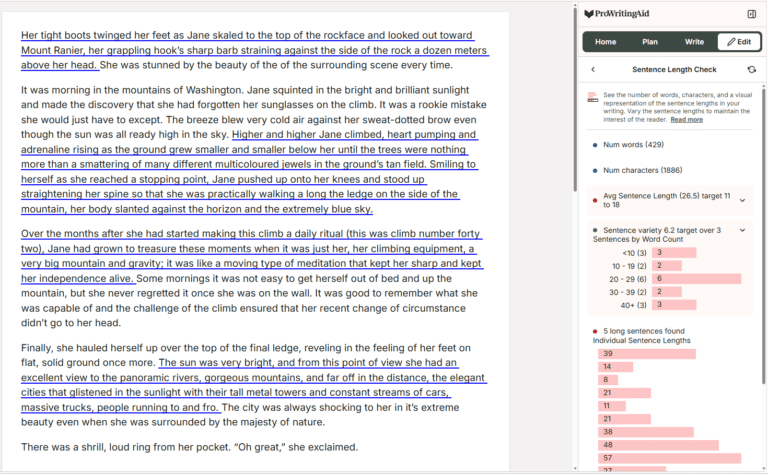
The first tool we’re going to look at is Hemingway Editor. The reason we started with this app is that it offers something slightly different compared to competitors. Rather than offering spelling and grammar suggestions (you’ll get those with Editor Plus), the Hemingway app’s free version improves your work by highlighting adverbs, passive voice, and catching wordy, hard-to-read sentences and phrases.
The goal is to make your work as easy to read as possible.

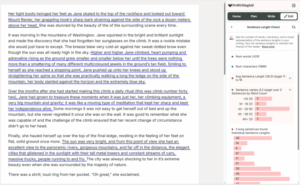
Unlike the alternatives in this article, Hemingway doesn’t offer any direct suggestions to improve your writing unless you upgrade to Editor Plus. Instead, it alerts you to possible errors in your writing for you to fix. It does this by highlighting sentences in the following ways:
- Yellow Highlights: Yellow highlights are “hard to read” sentences.
- Red Highlights: Red highlights are classified as “very hard to read,” so if you have red highlights, you’ll need to look at shortening sentences.
- Purple Highlights: Here you’ll be told to either omit or change a complex word.
- Blue Highlights: When a word is highlighted in blue, it is considered “weak phrasing.” For example, replacing “could” with “must.”
- Green Highlights: These indicate the use of passive voice.

As you can see, the edits the Hemingway app offers will make you a better writer. However, it isn’t a tool that’ll automatically turn you into . . . well . . . Hemingway.
Plus, its style feedback can be very helpful—as long as it’s the style you’re looking for. While Hemingway’s feedback on clarifying writing is great for blog posts meant for wide audiences, it might frustrate you more than it helps you if you’re writing a lengthy tome of literary fiction.
If you want to upgrade, Hemingway’s Editor Plus will highlight spelling and grammar issues, as well as provide suggestions for fixing it. You can also receive feedback on your document with their Beta Feedback tool and learn what you’re doing well in your piece, as well as what you can do to strengthen it.
The AI tool can help you make a range of changes to your text. For example, you could ask the AI to change the tone of your writing or to simply tighten your sentence.

Editor Plus uses a credit system for creating these AI sentences, with one credit used for each sentence changed. It’s important to note, though, that you won’t use any credits for the grammar suggestions, so you can make as many of those changes as you need to.
Pros
- Helps you strengthen your writing style with big picture feedback.
- The desktop app is available at an affordable cost.
Cons
- Does not offer any spelling or grammar suggestions unless you upgrade to Editor Plus.
- There are no extensions, so you’ll have to use the web app (or the desktop app).
Pricing
The app is free from your browser, or you can download the app to your desktop for a one-time $19.99 payment.
Editor Plus is a subscription, which starts at $25/month (or the equivalent of $8.33/month if you choose to bill annually), for 5000 credits. If you want to try Hemingway out before committing, a free trial is available.
Get started with Hemingway here.
Grammarly Review
Grammarly has been trusted by writers for years now, with over 40 million users worldwide. It’s one of the big players in the game and is one of the best spell-checking programs on the market.
CHECK OUT THE HOTTEST DEALS AND MORE ON AMAZON!
In the Shadow of Eight: Surviving the Reality of My Childhood
$19.50 (as of October 25, 2026 02:52 GMT +00:00 - More infoProduct prices and availability are accurate as of the date/time indicated and are subject to change. Any price and availability information displayed on [relevant Amazon Site(s), as applicable] at the time of purchase will apply to the purchase of this product.)
The Steps: A Memoir
$22.38 (as of October 25, 2026 02:51 GMT +00:00 - More infoProduct prices and availability are accurate as of the date/time indicated and are subject to change. Any price and availability information displayed on [relevant Amazon Site(s), as applicable] at the time of purchase will apply to the purchase of this product.)
Protocols: An Operating Manual for the Human Body
$28.23 (as of October 25, 2026 02:52 GMT +00:00 - More infoProduct prices and availability are accurate as of the date/time indicated and are subject to change. Any price and availability information displayed on [relevant Amazon Site(s), as applicable] at the time of purchase will apply to the purchase of this product.)
Partita: A Novel
$22.40 (as of October 25, 2026 02:52 GMT +00:00 - More infoProduct prices and availability are accurate as of the date/time indicated and are subject to change. Any price and availability information displayed on [relevant Amazon Site(s), as applicable] at the time of purchase will apply to the purchase of this product.)





Post Comment