Unlock Hidden Secrets: Effortlessly Export E-book Notes to Your Computer Like a Pro
Step 1: Highlight the Section You Want to Capture
On the iPhone Kindle app, you can highlight anything by selecting it with your finger on the screen.
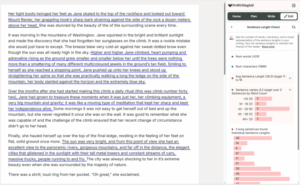
The image below shows a screen capture of the entire first page of my novel Son of Mary, with more than four paragraphs highlighted.


Step 2: Open the Notes Section in Your Kindle App
On the iPhone Kindle app, whenever you touch the screen in a non-highlighted area, a toolbar appears at the top of the screen, and one of the icons in that toolbar is the Notes icon.